


PassHub for Business
One simple plan
Client-side encryption with no master password and no per-seat pricing. Pay only for your team size.

No Master Password to Crack
Data is encrypted with a true 256-bit AES key from the WWPass Key app, not derived from a memorized password.

Phishing-Resistant Authentication
Authentication uses your WWPass Key instead of usernames and passwords, leaving no login fields or credentials to steal.

Flat-Rate Pricing
One flat rate covers your entire team band. No invoice recalculations every time you hire.

Full Feature Access Included
Directory sync, role-based group permissions, and internal audit logs are included across every tier.

PassHub pricing
Starter
Up to 10 users
$20$10/month
50% off your first year
when you sign up before
December 31, 2026
Best for:
Small teams needing a simple way to store, organize, and share credentials securely.
Team
Up to 20 users
$50/month
Best for:
Growing teams replacing spreadsheets, notes, and informal password sharing.
Growth
Up to 100 users
$100/month
Best for:
Companies integrating directly with Microsoft Entra ID or Google Workspace.
Scale
Up to 200 users
$200/month
Best for:
Expanding organizations managing credentials across multiple departments and projects.
Enterprise
200+ users
Custom
Best for:
Large organizations needing dedicated cloud infrastructure, on-prem hosting, or custom SLAs.
Everything included in your plan
- Client-Side AES-256 Encryption
- No Master Passwords
- Team Sync (Entra ID, AD, Google)
- Isolated Safes & Group Access
- Full Internal Audit Logs
- Dedicated Regional Cloud (US, EU, AU)
- Flat monthly billing with no hidden seat fees. Includes a 30-day money-back guarantee. Cancel anytime.
Built for businesses
that need to protect
their secrets
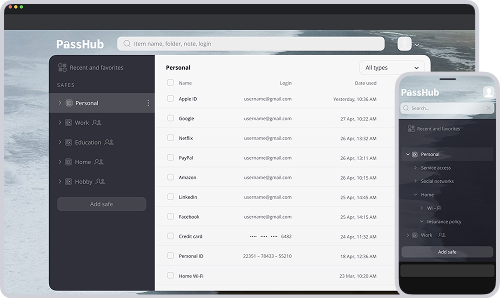
PassHub Business helps teams organize shared credentials, control access by role, and eliminate spreadsheets, plain-text notes, or risky chat-based password sharing.
Why Teams Choose It
 Organized Shared Safes
Store passwords, notes, and files in encrypted team safes.
 Role-Based Permissions
Assign group permissions to grant or revoke access instantly.
 Access & Audit Trails
Track user logins and admin actions with detailed logs.
 Central Directory Sync
Sync with Microsoft Entra ID, Active Directory, or Google.
Best For

Financial Services
Client portals, tax systems, banking credentials, and accounting records.

Agencies
Client account logins, shared ad platforms, CMS access, and staging credentials.

Education
Administrative portals, student data systems, and staff department logins.

Non-Profits
Donor management tools, fundraising platforms, and volunteer accounts.

IT & Tech Companies
Server credentials, API keys, database access, and developer secrets.
Setup in 4 steps
Download the
WWPass Key AppInstall the free WWPass Key app on iOS or Android to set up your cryptographic key.
Log in to WWPass
ConsoleScan the QR code with your WWPass Key app to access the management portal.
Go to WWPass ConsoleConfigure Your
SpaceSelect your server location, choose your company domain name (company.passhub.us), and pick your user tier.
Deploy & Invite
Complete secure checkout via Stripe, launch your instance, and connect your team.
PassHub architecture
Security by design. Zero single points of failure.
 Client-Side Encryption
Standard Approach
Most password managers process credentials on their servers, risking exposure during transit or cloud synchronization.
PassHub Advantage
Everything is encrypted right in your browser before leaving your device. The PassHub server stores only encrypted data and never sees your passwords, notes, or files in plaintext.
No Master Password
Standard Approach
Competitors derive encryption from human-memorized master passwords that can be stolen, phished, or cracked offline using GPU clusters.
PassHub Advantage
PassHub eliminates master passwords completely. Encryption keys are generated directly by device hardware via the WWPass Key app, leaving no encryption keys in the cloud to steal!
 Safe-Level Isolation
Standard Approach
Standard vaults link entire accounts to a single global key, creating a wide blast radius if compromised.
PassHub Advantage
PassHub organizes credentials into independent safes. Each safe uses its own encryption key, and administrators cannot view safe contents unless explicitly granted access.
Ready to protect your access?
Start protecting your business credentials with PassHub by WWPass. Replace
master passwords with secure passwordless login and manage company
access with zero hassle.